Viewing My Payroll History Report
If you are an employee and have any questions about your paychecks, W-2s, or using the employee portal, please contact your employer. Patriot Support staff cannot answer your questions via chat, email, or phone. We can only speak with authorized company contacts.
The Payroll History report in your employee portal shows a summary of your pay since the beginning of the calendar year. The difference between this report and the “Paychecks” page is this report shows all payroll activity, including paychecks, payroll edits, and prior payroll history that may have been paid outside of the system.
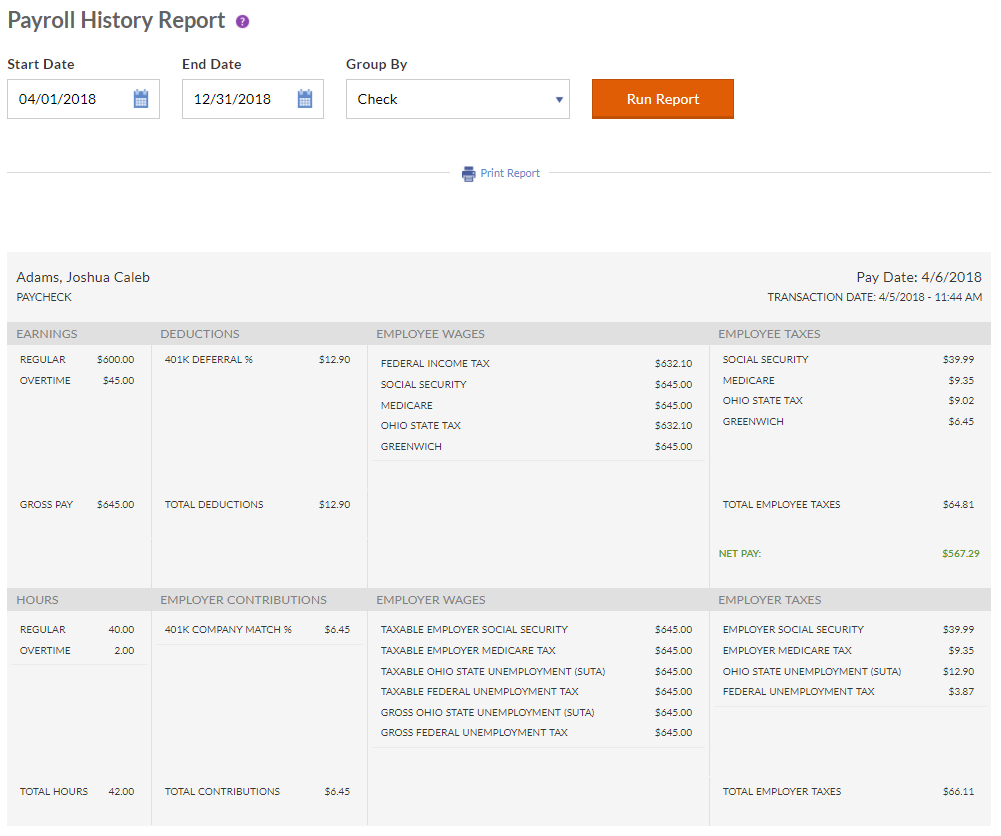
1.根据报告,点击Payroll History.
2. By default, the date range at the top shows January 1 through December 31 of the current year. You can change the “From” and “To” date fields.
3. In the “Grouped By” list, selectCheck, Pay Date,orTotals.
- SelectingCheckwill display detail for each paycheck.
- SelectingPay Datewill display detail for each pay date, and will combine any multiple paychecks received for a pay date.
- SelectingTotalswill display the total amounts for the date range.
4. ClickRun Report.
You can print a PDF version of this report. Click the “Print Report” link under the date fields. A PDF document will download, and you can open or save to your computer.
[DEFINITION: Take-Home Pay]
[RELATED ARTICLE: Understanding Take-Home Pay]